What an AI review finds in a bioRxiv preprint
Know what reviewers will say before you submit your bioRxiv preprint to a journal.
- biorxiv
- manuscript-review
- calibre
Shane Ehrhardt, Founder · October 18, 2026

Before you submit your bioRxiv preprint to a journal, you want to know what the reviewers will say. A full review from Explore Science reads the paper the way a reviewer does. This post shows what it checks, one finding in detail, and how to run it from your Author Area.
What does the review check?
The review scores the paper across eight categories, each with it's own merits and issues.
| Category | Example of what it assesses |
|---|---|
| Research Design | Is the study design right for the question? |
| Data and Evidence | How was the data collected and measured? Are the sources sound? |
| Analytical Approach | Are the statistics or methods appropriate? |
| Scholarly Grounding | Does the paper accurately cite and credit prior work? |
| Reporting Quality | Can a reader evaluate and reproduce the work? |
| Interpretive Rigour | Do the results support the claims? Are the limitations stated? |
| Ethical Conduct | Are consent, approvals, conflicts and data integrity in order? |
| Contribution | What does the work add to the field? |
The eight scores combine into one Calibre score from 0 to 100. The weights change with the study design.
An example: the wrong unit of analysis
Pseudoreplication is a common problem in neuroscience papers. Here is one finding from a review of a synthetic mouse study. The manuscript says:
Dendritic spine density was compared between groups with an unpaired t-test (n = 36 slices per group, from 3 mice).
Treated animals showed a significant increase in spine density (p < 0.001).
The review marks it major, under Analytical Approach.
- The problem. The treatment was given to each mouse. But the test counts 36 slices from 3 mice as 36 independent samples. So the p-value uses the wrong n.
- The fix. Fit a mixed-effects model with mouse as a random effect. Or test the mean for each mouse.
- Where. State the unit of analysis in Methods and in the Figure 3 legend. Report the degrees of freedom and the exact p-value, so a reader can see which n the test used. If 3 mice per group cannot support the claim, say so in Limitations.
- The evidence. The finding cites the published work behind it.
Lazic SE. The problem of pseudoreplication in neuroscientific studies: is it affecting your analysis? BMC Neuroscience. 2010;11:5. doi.org/10.1186/1471-2202-11-5. An illustration on a synthetic study; no real manuscript was assessed.
Each finding links to its passage in your manuscript. Merits have the same format, so you also know what to keep.
Can I check it against ARRIVE too?
Yes. ARRIVE 2.0 is the reporting guideline for animal research. Item 1b asks for the experimental unit. The example manuscript does not state it, so the check marks the item not met. If the authors state the unit, the problem above becomes clear.
Are my references checked?
Yes. The review checks each reference against its source. It flags wrong DOIs, titles, authors and years. It also flags duplicates and entries that are not cited in the text. Reviewers notice these errors.
Can I assess the Novelty of my work?
Yes, you can run a seperately run a Novelty check on your work from within your Explore Science Project. The review finds the related published work and compares your claims with it.
What do I do with the review?
- Ask Rosa. The co-scientist has your paper, the review and the references. Dive deeper into findings, argue the other side or plan the revision.
- Share it. One click and share your review with your co-authors for simple collaboration.
- Upload the revision. The next review shows which issues you fixed and gives a new score.
- Iterate. Each critique comes with a framework for addressing. You can address the findings from your review, resubmit, and map your progress across versions.
How do I run one from bioRxiv?
- Post your preprint on bioRxiv.
- Open your Author Area.
- Beside the manuscript, choose Submit Preprint to External Author Service.
- Choose Explore Science.
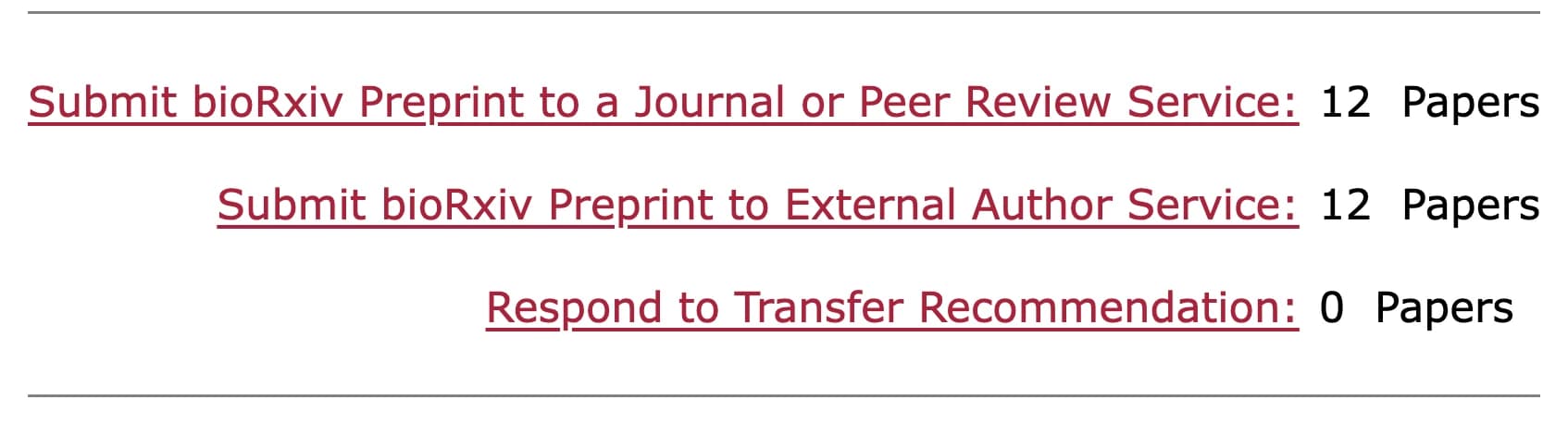
We get the manuscript and its author list from bioRxiv, so you do not upload anything. You then get an email with a link. Sign in with your ORCID iD, or with a code sent to the email address on your submission. Then choose the full review.
The first review from the Author Area is complimentary. The bioRxiv integration page shows the steps on one screen.
Common questions
Who sees my review? You and the people you invite. Nothing goes back to bioRxiv.
Can I review a paper that is not on bioRxiv? Yes. Upload any manuscript from your dashboard.
What about a medRxiv preprint? You get the same review from the medRxiv Author Area. You can also choose a reporting guideline check. How to check a medRxiv preprint against CONSORT or STROBE explains it.
bioRxiv, medRxiv and openRxiv are trademarks of openRxiv, used with permission.